
A display that looks impressive at the front of a classroom may prove difficult to read from the back row. Screen dimensions influence more than appearance: they affect text legibility, image clarity, student participation, and the way teachers organize lessons. The right size depends on the room’s physical dimensions, seating arrangement, viewing distance, and teaching activities.
An interactive board for teaching should provide comfortable visibility across the intended audience without overwhelming the available wall space. With experience in educational display technology, Ledman offers solutions for learning environments where screen usability and classroom layout need to work together.
Classroom Dimensions and Viewing Distance
Room length is one of the first measurements to consider. A compact classroom with a short distance between the front wall and the last row may function well with a medium-sized display, while a lecture room extending across a much larger area usually needs a bigger screen. The objective is to make text, diagrams, and visual demonstrations readable from every regularly occupied seat.
Viewing distance provides a more practical reference than room area alone. A student sitting six meters away needs a different level of visual coverage from someone seated two meters from the screen. Screen size should be evaluated alongside resolution because a larger image with insufficient pixel density can make small text or detailed graphics appear less sharp. Schools comparing classroom display boards should consider both the physical dimensions and the clarity of the content shown.
Ceiling height and wall space also influence installation decisions. A screen positioned too high can cause neck discomfort, particularly for younger students, while an oversized unit may interfere with whiteboards, storage cabinets, windows, or classroom lighting. Before selecting a display, the installation area should be measured from floor level, with attention to the screen’s center position and the height of the front row.
Seating Layout and Screen Visibility
Traditional forward-facing seating creates a relatively predictable viewing arrangement. Students generally look toward the same wall, allowing the display to be positioned along the main teaching axis. In this setting, the screen should be large enough for students at the farthest seats while remaining comfortable for those sitting close to it. A suitable interactive board for teaching can support this arrangement through clear text, diagrams, and shared lesson materials.
Group-based learning requires a slightly different approach. Desks arranged in clusters or U-shaped layouts can place some students at sharp viewing angles. A display with a wide viewing angle helps maintain image consistency across the room, while its position should allow students to see the content without repeatedly turning their bodies. In larger classrooms, secondary displays may also be worth considering if a single front-facing screen cannot serve every seating area.
Sightline obstructions deserve attention during the planning stage. Tall furniture, computer monitors, raised platforms, and students seated in front rows can block parts of the screen. Schools assessing classroom display boards should map the actual seating positions rather than relying on a simple measurement from the first desk to the back wall. A modest adjustment to mounting height or screen location can sometimes improve visibility more effectively than increasing the diagonal size.
Matching Screen Size to Teaching Activities
The type of content used in lessons affects the size requirements. Text-heavy presentations, spreadsheets, scientific diagrams, and detailed maps require enough screen area for information to remain readable. Video lessons and large visual demonstrations may benefit from a wider display, particularly when students need to observe small details. Teachers should consider their most demanding teaching materials rather than selecting a screen based only on occasional video playback.
Interactive activities introduce another consideration: students may approach the screen to write, annotate, solve problems, or manipulate learning materials. The display should be mounted at a practical height so that both teachers and students can reach the interactive area comfortably. An interactive board for teaching used for collaborative exercises needs adequate working space, not merely enough display area for passive viewing.
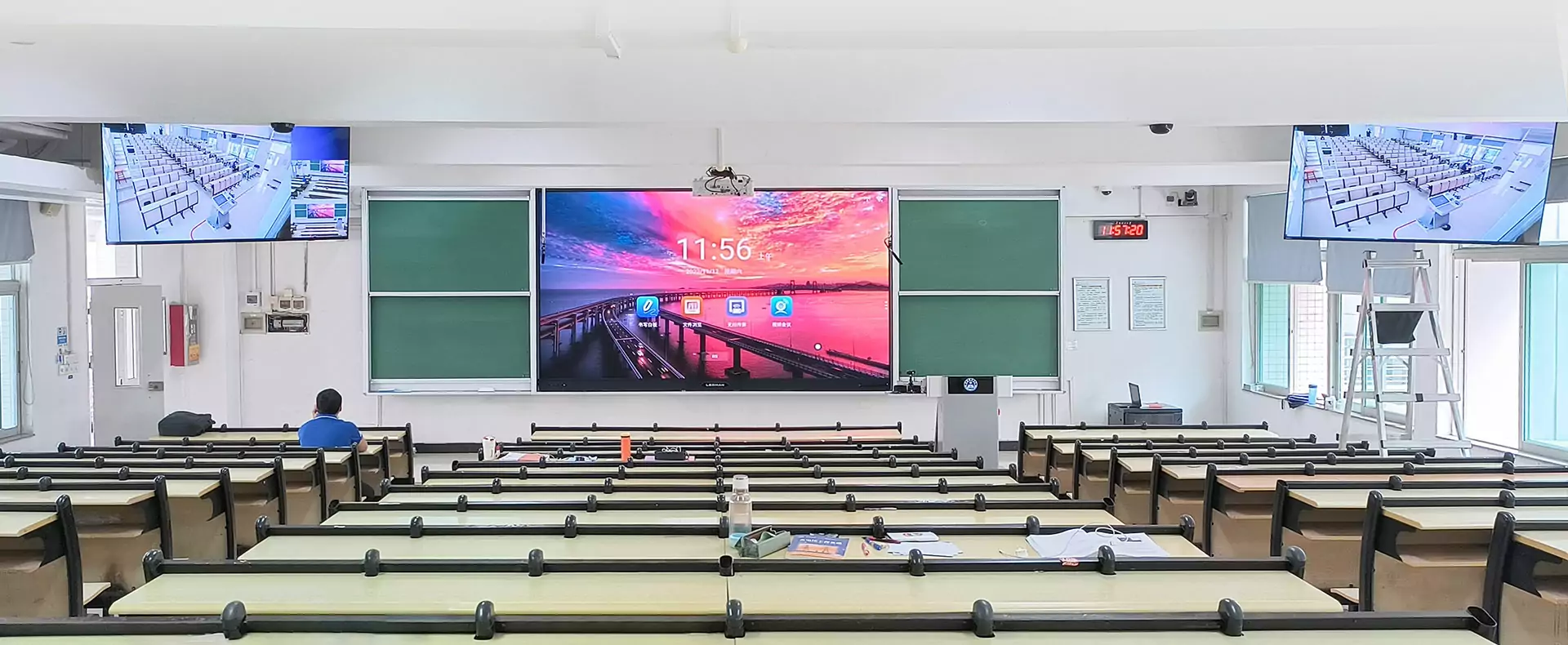
Ledman’s LEDHUB – Interactive Education AIO 16″ is an education-focused all-in-one interactive display designed for classroom use. Its role in a Shenzhen university setting illustrates how interactive display equipment can support shared teaching activities. When assessing this type of solution, schools should review the actual screen dimensions, touch interaction requirements, installation height, and compatibility with their teaching environment rather than assuming that one configuration suits every classroom.
Practical Size Selection and Installation Planning
A useful selection process begins with a classroom floor plan. Measurements should include room depth, width, ceiling height, front-wall dimensions, and the distance from the screen to the farthest seat. Marking the seating layout on the plan helps identify viewing angles and potential obstructions. These details provide a more reliable basis for comparing screen sizes than choosing a display by diagonal measurement alone.
Schools should also consider how the room may be used in the future. A classroom that currently accommodates small groups may later host larger lectures or collaborative sessions. The display should suit the expected audience and teaching format, while installation provisions should account for power connections, network access, cable routing, wall strength, and maintenance access. A well-planned classroom display boards installation can remain practical as classroom activities evolve.
Conclusion
The most suitable classroom display size emerges from the relationship between physical space, audience position, and teaching purpose. A large lecture room may call for a wider viewing area, while a compact teaching space can achieve clear visibility with a more modest installation. Seating angles, content detail, mounting height, and future room use all deserve consideration before a decision is made.
Ledman‘s work in educational display technology reflects the growing role of interactive equipment in learning environments. Ultimately, an interactive board for teaching and well-planned classroom display boards should make lesson content accessible across the room while fitting naturally into the way students and teachers use the space.